Storage Sense deleted my backtest cache because Windows could not tell I was reading it
I run eleven automated crypto trading bots. Two of them — a 25-coin bot and a 50-coin bot — exist because a machine-learning backtest said their entry signal beats a coin-flip by enough to trade live. That backtest takes hours to run, so the results are cached to disk. On September 25th I went looking for the 25-coin cache and it was not there.
Not corrupted. Not truncated. Gone, as if it had never been written. I had not deleted it. Nobody else has access to this machine. The folder it lived in, Windows' default %TEMP%, still had fifteen other cache files in it, ranging from a few hundred kilobytes to 279 megabytes, all built by the same scripts, all supposedly just as permanent.
These caches exist because the training run behind them is not cheap. Each one is a walk-forward retrain: the model is refit every quarter on data up to that point and scored only on the quarter after, so a single 25-coin pass touches years of history dozens of times over. That is normally hours of wall-clock time, which is the whole reason the output gets pickled to disk instead of recomputed on every backtest.
The file that wasn't there
My first assumption was the boring one: I'd cleared %TEMP% myself, weeks ago, and forgotten. I checked shell history. Nothing. I checked whether the training script had a bug that skipped the final to_pickle() call. It didn't — the script has run successfully dozens of times and every other cache from the same family was sitting right there, untouched.
So the file had existed, and then it hadn't, and I hadn't done it.
Ruling out the boring explanations
Before I looked at Windows itself I checked the things that would make this a non-story. Disk space: 206GB free, nowhere near a cleanup trigger. The repo's own file-handling code: no path in it ever calls delete or unlink on anything in %TEMP%. Antivirus quarantine: nothing logged. Each of these would have been a five-minute embarrassing answer. None of them were it.
What was left pointed outside my own code, which is a less comfortable place to look, because it means the bug isn't in anything I can read.
What Windows was actually doing to it
I listed every remaining file in %TEMP% by modification time. Every single one, of every type, was from September 18th, 17:27, or later — a hard boundary, not a gradual thinning. That is Storage Sense: a built-in Windows feature that sweeps temporary files older than a set age, seven days by default, and it was switched on.
The part that made this survive as long as it did is a setting called DisableLastAccess, which is set to 1 on this machine. With it on, Windows stops updating a file's last-accessed timestamp when you read it — a performance optimization from an era of spinning disks. Storage Sense's age check uses that same timestamp. The practical effect: a file I read every single day, for a backtest that runs on a schedule, looked to Windows exactly like a file nobody had touched since the day it was written. Seven days after creation, indistinguishable from abandoned.
DisableLastAccess is an NTFS setting (fsutil behavior query disablelastaccess confirms it, or the registry key under HKLM\SYSTEM\CurrentControlSet\Control\FileSystem), and turning it on is a decades-old performance recommendation: without it, every file read forces a metadata write to update the access timestamp, which costs real I/O on a busy volume. On a database server that trade-off makes sense. On a machine where an OS-level cleanup feature uses that same timestamp to decide what counts as abandoned, the two settings quietly contradict each other, and nothing surfaces the contradiction until a file you need turns out not to be there.
I don't know how long this setting has been active on this machine, and I'm not going to guess. What I can say is that it took this specific cache file disappearing for me to find it, which means it had already been true for however long this bot has been running.
What else was sitting in the blind spot
Once I understood the mechanism, the question stopped being "what happened to this one file" and became "what else is exposed the same way." I listed the whole folder.
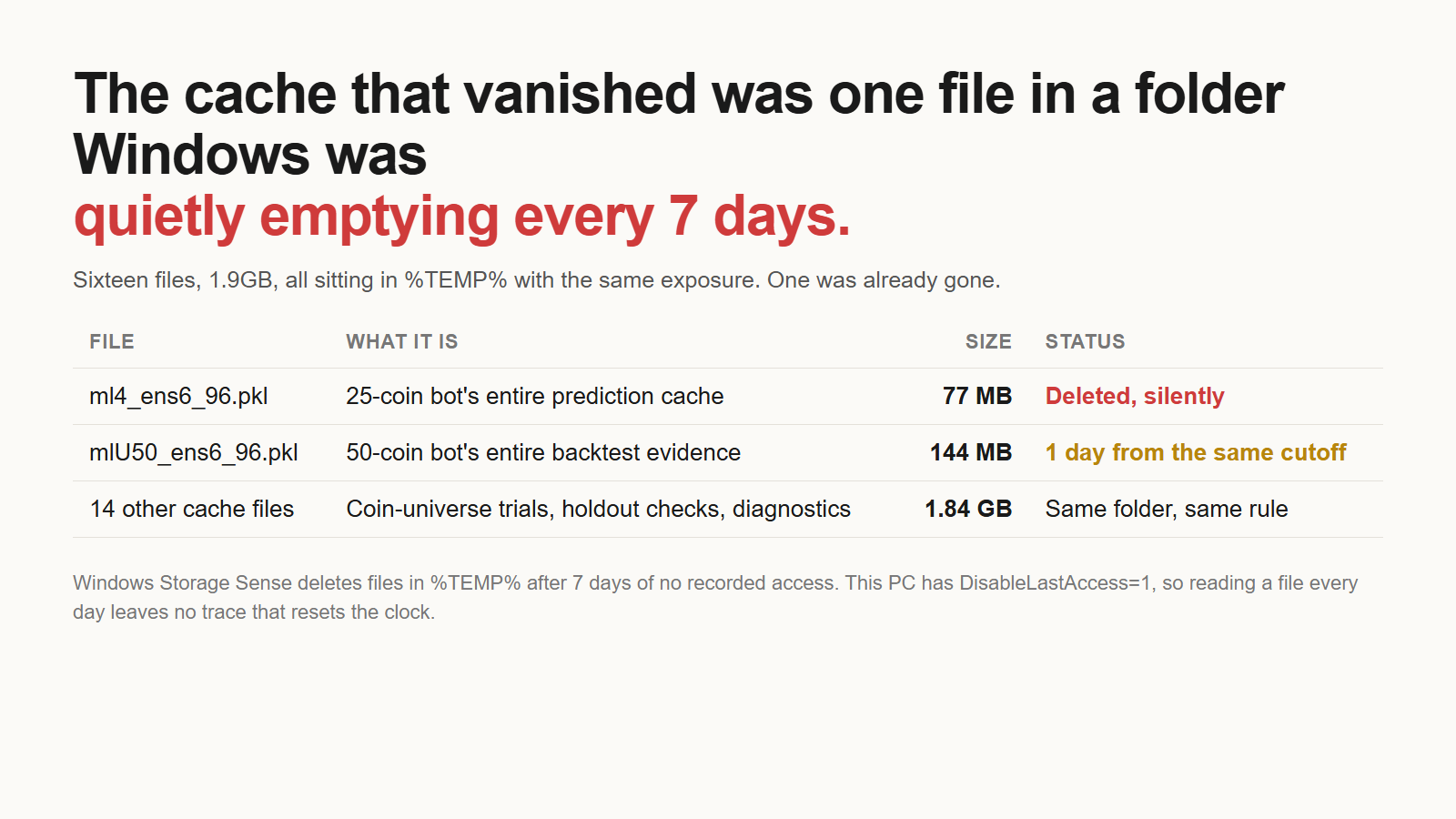
Sixteen files, roughly 1.9 gigabytes, all cache from months of walk-forward training runs — coin-universe expansion trials, holdout checks on new listings, feature-mix experiments, most of them already rejected and kept only for reference. One of them was mlU50_ens6_96.pkl, which the project's own notes describe as the entire backtest evidence behind the 50-coin bot's coin-universe decision. By my own write-up at the time, it was one day from the same seven-day cutoff that had already taken the 25-coin cache.
I want to be precise about what that "one day" claim is: it's a note I wrote the same afternoon, not a timestamp I can still verify, since I moved the files before checking exact ages on each one individually. I'm including it because it's the number I actually wrote down in the moment, not because I can re-derive it now.
Every file in that folder had the same exposure, not just the one I happened to notice going missing. Nothing about the 50-coin file made it special to Windows. It was next only in the sense that its clock happened to run out first among the ones still alive.
Rebuilding: 9 minutes, not hours
I moved everything left to ~/ml_cache, pointed the training script's cache directory at it instead of %TEMP%, and wrote down the rule in a note file so it doesn't happen again: nothing that needs to survive more than a week goes in a folder an OS feature is allowed to sweep.
Then I had to decide whether to rebuild the missing 25-coin cache. Doing that honestly meant not changing anything about how it's built, because a cache produced by a different recipe isn't comparable to the numbers I'd already reported to myself. So the rebuild used the same 25 coins, the same target definition, the same quarterly walk-forward split with training rows sampled every 4 bars and a 97-bar boundary excluded at each cutoff, and the same six-model ensemble split across three tree depths and two random seeds.
The script's own comment, written before I ran it, estimated "hours" for that. It finished in 9 minutes. I don't have a clean explanation for the gap between my estimate and the measured time — possibly the original multi-hour run included setup work this rerun didn't need to repeat, possibly my estimate was just wrong. I'm not going to pretend I know which.
Did the rebuild reproduce the old numbers?
A fast rebuild is only useful if it rebuilds the same thing. The training pipeline has randomness in it — the ensemble draws from six models across different depths and seeds — so an exact match was never the bar. The bar was: close enough that the 25-coin bot's live behavior, which was built on the old numbers, is still standing on solid ground.
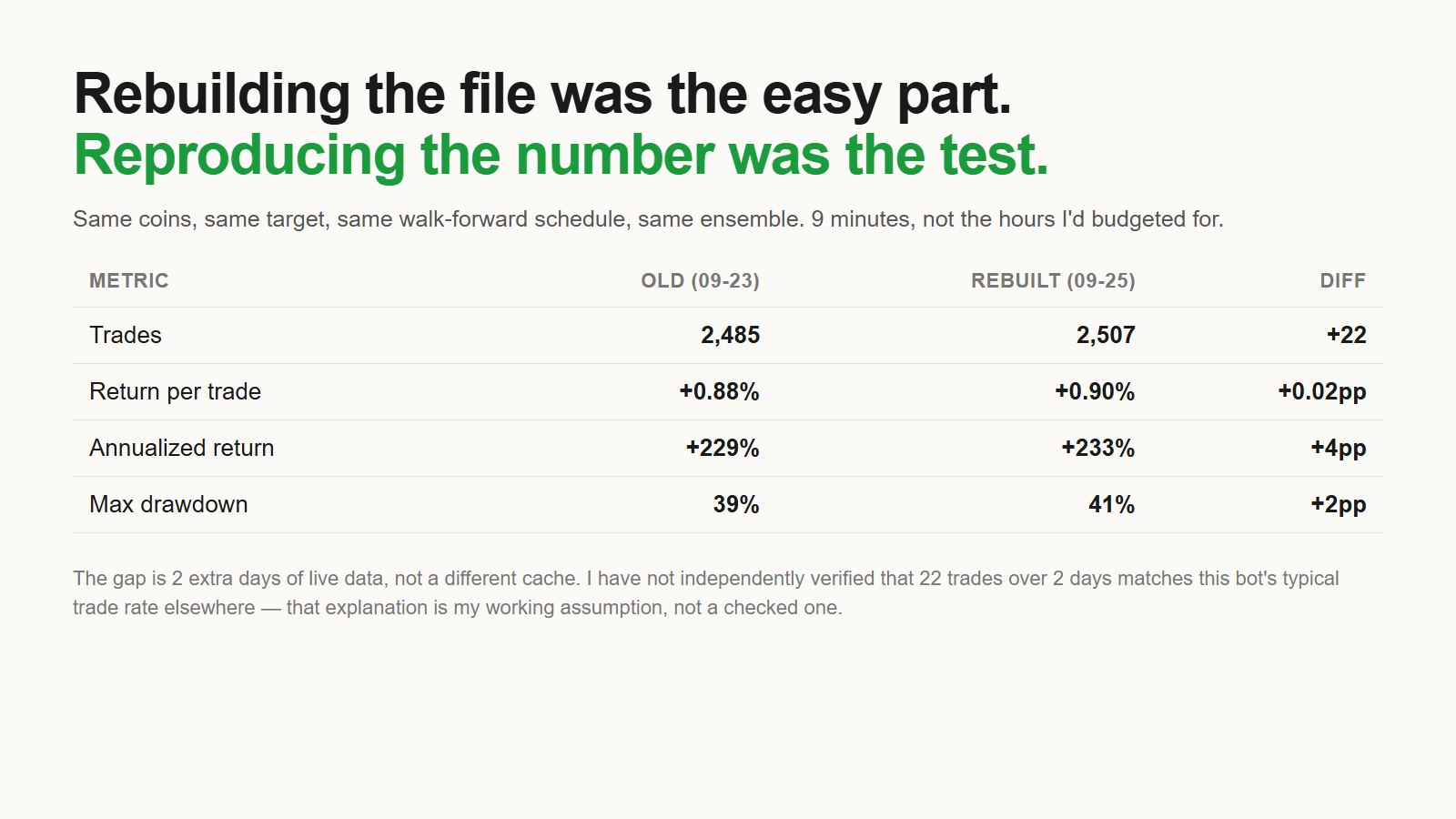
Every metric moved in the same direction, by a small amount. My working explanation is that two more days of live market data landed in the rebuild than were in the original run, adding roughly a dozen trades a day at this bot's frequency. I have not gone and independently confirmed that trade rate against the bot's actual live log elsewhere — I'm stating it as the explanation I believe, not one I've checked a second way.
The metric I trust without needing that explanation to be true is the direction split, because it doesn't depend on how much data was in the window — it's a ratio, not a count.
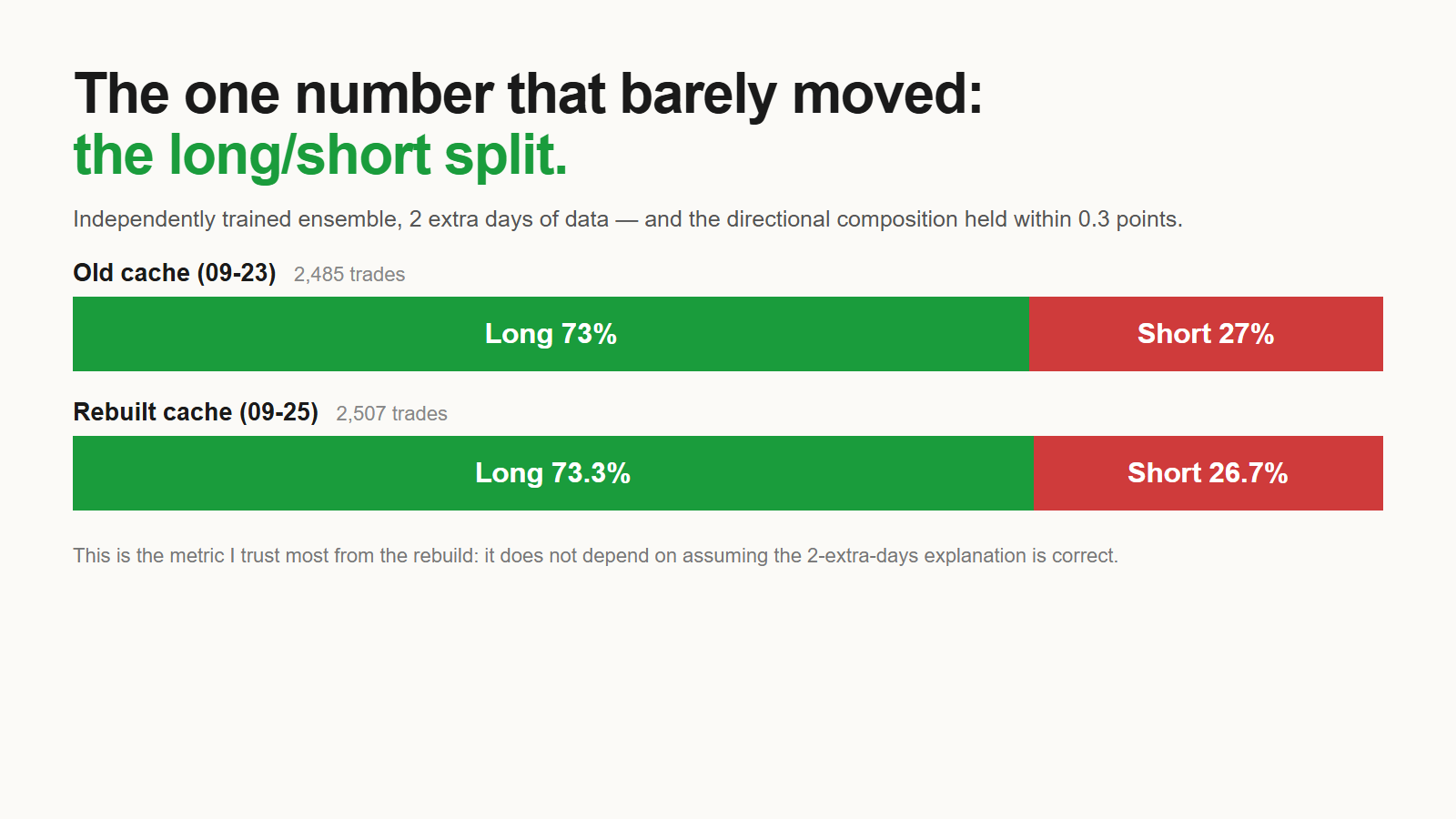
73/27 versus 73.3/26.7, from an ensemble that was retrained from scratch rather than restored from backup. That is the strongest evidence I have that the rebuild is the same model behaving the same way, not a coincidentally similar one.
This connects to a problem I found the week before in the same codebase: a backtest engine that had never modeled forced liquidation, and gave the wrong leverage answer because of it. Different bug, same root cause — infrastructure I trusted because it had run for months without complaint, not because I had checked its assumptions.
What I am not claiming
I am not claiming this is a Storage Sense bug. It did exactly what it's documented to do; the surprising part is that DisableLastAccess=1 makes "documented behavior" indistinguishable from "silently deletes files you're actively using," and I didn't know that combination existed on this machine until it cost me a cache file.
I am not claiming the rebuilt cache is provably equivalent to the original. I'm claiming four summary statistics and a direction ratio landed close together, on one rebuild, with an explanation for the gap that I believe but haven't independently verified.
I am not claiming I know how long the exposure existed before I found it, or whether any other file has already been silently lost and simply never missed. I only found this one because I went looking for it on a specific day for an unrelated reason.
And I am not claiming the 50-coin bot's cache was in unique danger. It shared a folder and a deletion rule with fifteen other files. It just happened to be the one I'd written a note about.


Comments
Post a Comment